MCP Core Architecture Explained
Hosts, Clients, Servers, Tools, Resources, and Prompts

If you’ve been seeing MCP (Model Context Protocol) everywhere but still feel the architectureis a bit fuzzy, you’re not alone.
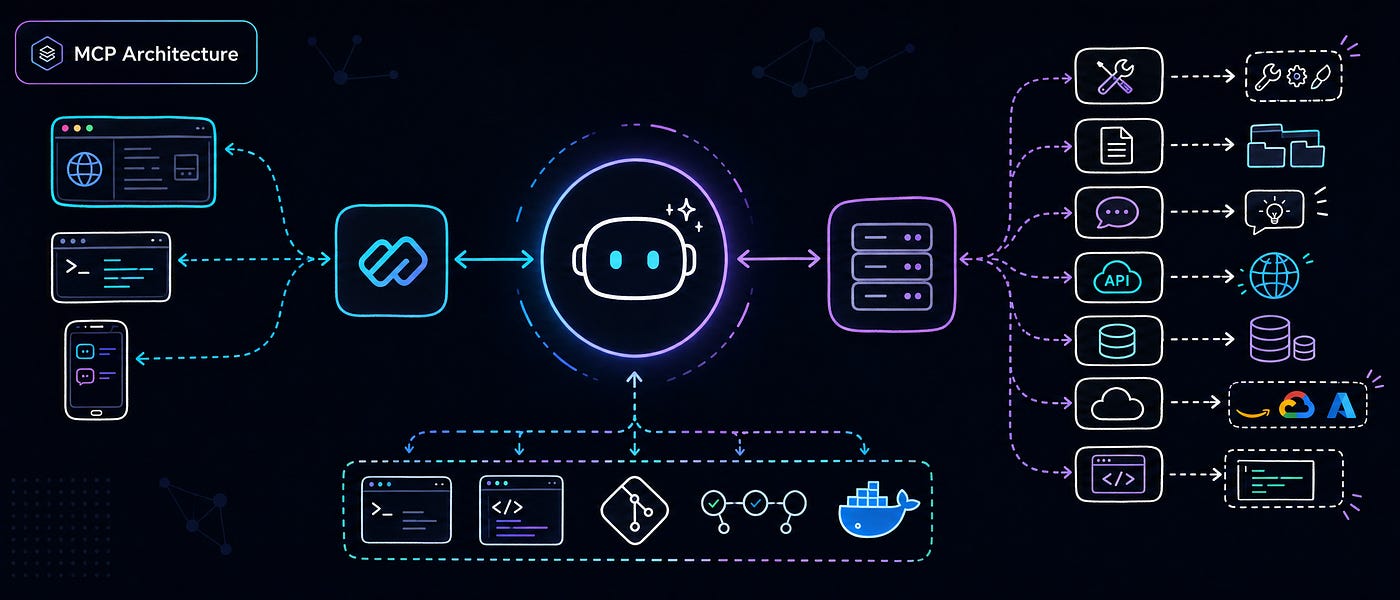
A lot of people understand MCP at a conceptual level: AI apps can connect to tools and data through a standard interface. But when it comes to how the pieces actually fit together the host application, MCP client, MCP server, tools, resources, prompts, and backend systems, things often get mixed up.
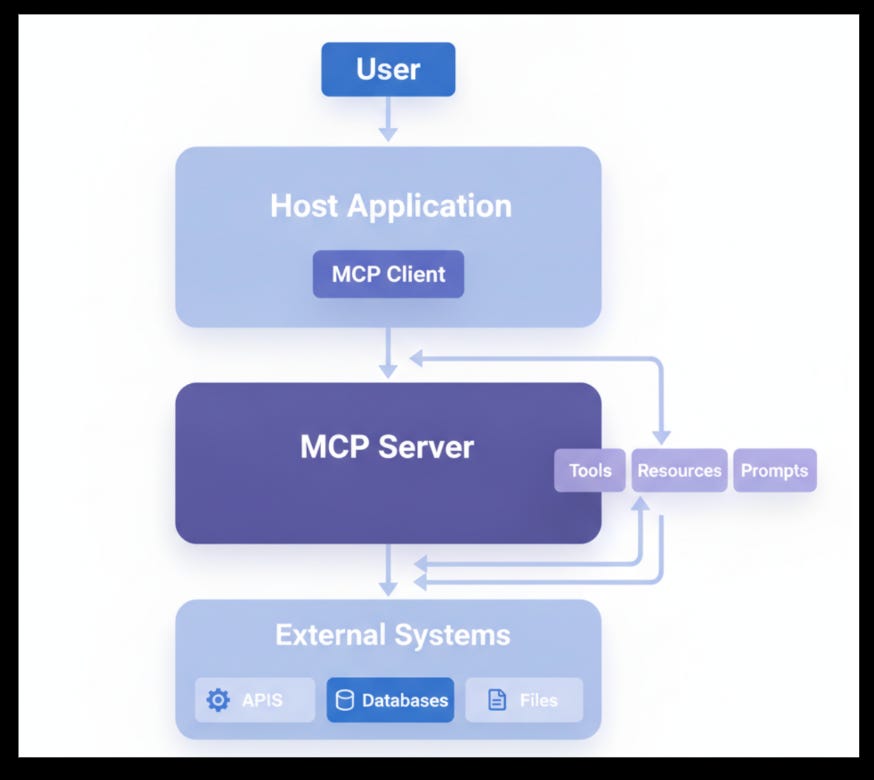
That confusion usually leads to bad designs:
putting business logic in the host,
overloading the server with workflow logic,
treating every capability like a tool,
or skipping proper protocol boundaries entirely.
This is exactly why MCP core architecture matters.
Not a Medium Member? Read it here for FREE
In this post, we’ll break MCP down into a clean mental model so you can understand:
what each component is responsible for,
how the request/response lifecycle works,
where tools, resources, and prompts belong,
why separation of concerns is critical,
and how to design MCP systems that scale beyond demos.
Why MCP Architecture Matters
MCP is not just a connector format. It is a system design pattern for integrating AI applicationswith external capabilities in a structured, reusable, and governable way.
At a high level, MCP helps solve a recurring problem in AI product engineering:
How do you let an AI-powered host application safely discover, access, and orchestrateexternal capabilities without tightly coupling the assistant to backend systems?
Without a formal architecture, teams often build ad hoc integrations:
the UI directly calls databases,
the assistant runtime embeds tool logic,
prompt templates are buried in business code,
and each new integration becomes harder to maintain.
MCP introduces clear boundaries:
hosts manage user interaction and orchestration,
clients handle protocol communication,
servers expose capabilities in a standard format,
capabilities define what can be used,
backend systems remain the actual system of record.
That separation is what makes MCP powerful.
The Big-Picture Mental Model
The simplest way to think about MCP is as a layered system:
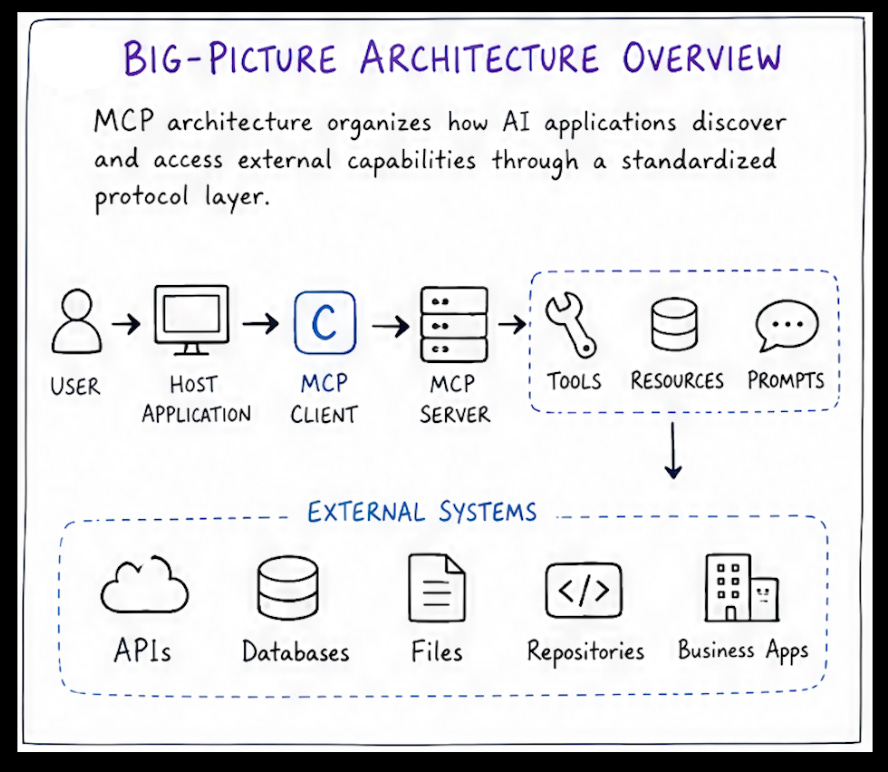
User interacts with an AI-powered application.
The host application decides what the assistant is trying to do.
The MCP client discovers and invokes the right capability.
The MCP server exposes tools, resources, and prompts.
Those capabilities connect to external systems such as APIs, databases, filesystems,SaaS apps, or internal services.
Structured results flow back to the host, which turns them into a user-facing response.
In other words:
MCP separates AI interaction from capability access, and capability access frombackend execution.
That single principle explains most of the architecture.
Core Components of MCP Architecture
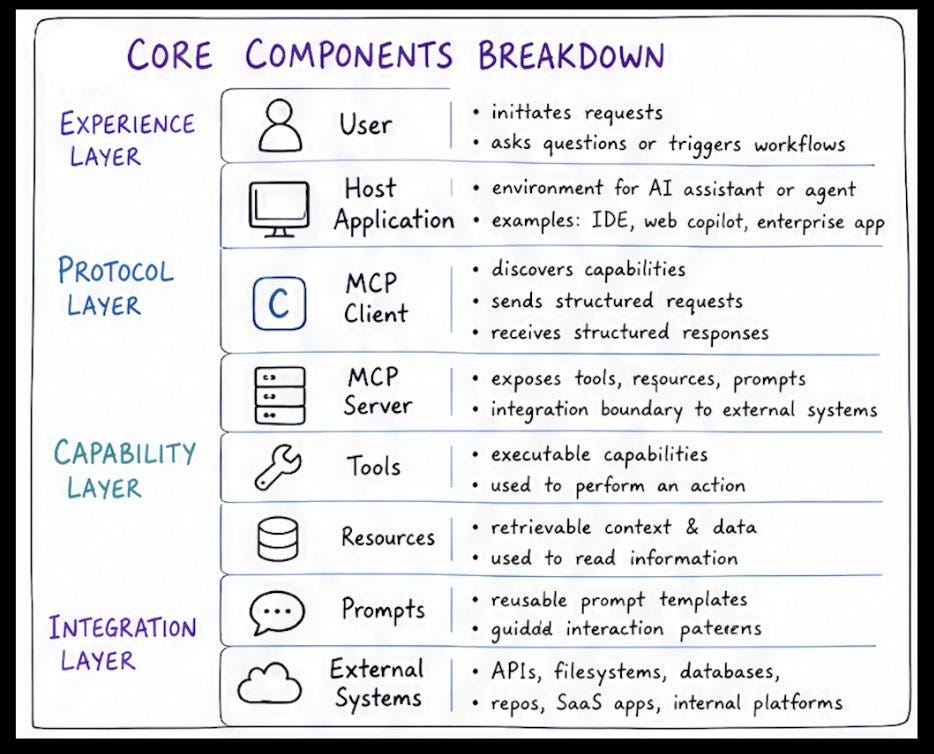
Let’s unpack each component.
1. User
The user is the origin of intent.
They ask questions, trigger workflows, request analysis, retrieve information, or initiateactions. MCP itself does not begin with the protocol — it begins with user intent entering a hostapplication.
Examples:
“Summarize the latest deployment incident.”
“Find the metrics spike and open a ticket.”
“Explain this source file.”
“Fetch the design spec from our docs system.”
The user does not interact with MCP directly. They interact with the host.
2. Host Application
The host application is the environment where the AI assistant runs.
This may be:
an IDE assistant,
a team chat agent,
a support copilot,
an enterprise AI workspace,
a desktop app,
or a custom orchestration runtime.
The host is responsible for:
managing the user experience,
understanding assistant workflow context,
deciding when external capability access is needed,
and integrating results into a final response.
The host should not own:
raw backend integrations,
server-side business logic,
or protocol-exposed capability definitions.
A good host is an orchestrator, not a monolith.
3. MCP Client
The MCP client is the protocol-aware component inside the host environment.
Its job is to:
discover available capabilities,
send structured requests,
receive structured responses,
and manage protocol-level interaction with one or more MCP servers.
Think of the client as the host’s protocol adapter.
It should handle:
capability discovery,
request formatting,
response handling,
connection/session behavior,
and transport-level coordination.
It should not be overloaded with:
business workflows,
data storage,
or custom logic that belongs in server/backend layers.
A common anti-pattern is embedding too much intelligence into the client. Once that happens,the protocol boundary becomes blurry and maintainability drops fast.
4. MCP Server
The MCP server exposes capabilities to clients through a standardized interface.
This is the layer that presents:
tools for taking action,
resources for retrieving data or content,
prompts for reusable interaction templates.
The server acts as a capability surface between host-side AI applications and externalsystems.
Its responsibilities typically include:
exposing structured capabilities,
validating input,
routing requests,
integrating with backend services,
packaging responses,
enforcing access controls and operational boundaries.
The server is not the system of record. It is the abstraction layer in front of those systems.
That distinction matters a lot.
5. Tools
Tools are executable capabilities.
Use a tool when the assistant needs to do something.
Examples:
create a ticket,
send a message,
trigger a deployment,
update a CRM record,
run a code action,
start a workflow.
A tool is action-oriented. It usually produces a side effect or initiates one.
If a capability performs an operation, modifies state, or kicks off execution, it likely belongs inthe tool category.
6. Resources
Resources are retrievable content or data.
Use a resource when the assistant needs to read something.
Examples:
fetch a document,
load a config file,
retrieve logs,
read a knowledge base article,
access a repository file,
query a dashboard snapshot.
A resource should represent information access, not action execution.
One of the most common modeling mistakes in MCP is turning every read operation into a tool.That works in small demos, but it weakens semantics and makes the capability surface lessintuitive.
7. Prompts
Prompts are reusable prompt templates or guided interaction patterns.
Use prompts when you want to standardize how the host or assistant frames a task.
Examples:
“Explain this code file for a junior engineer.”
“Generate a postmortem summary from incident notes.”
“Review this architecture document for security concerns.”
“Convert deployment logs into a human-readable incident narrative.”
Prompts are not raw backend systems and not execution endpoints. They are structuredreusable interaction assets.
They become especially useful in enterprise settings where teams want consistency,repeatability, and controlled prompting behavior across products.
8. External / Backend Systems
These are the real systems where data lives and work happens:
APIs,
databases,
filesystems,
repositories,
SaaS platforms,
internal business systems.
These systems should remain behind the MCP capability layer.
Why? Because exposing them directly to the host creates tight coupling and weakens abstraction. MCP works best when backend systems are wrapped in clean capabilitydefinitions rather than being treated as raw integration endpoints.
The Layered Architecture of MCP
A robust MCP design usually separates into five layer.
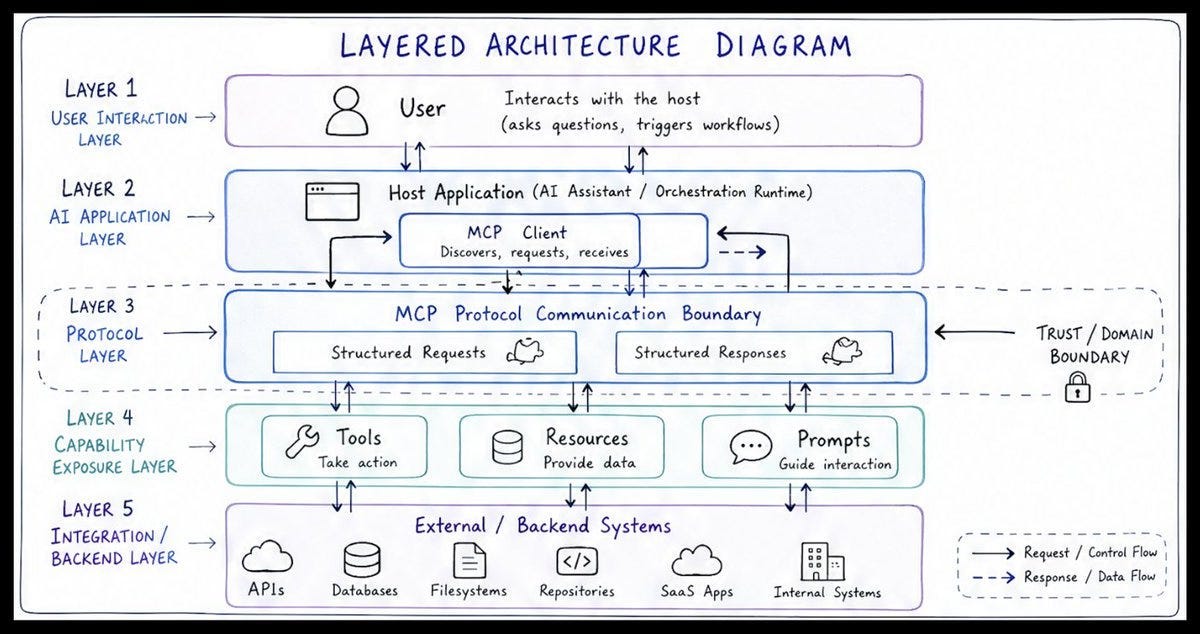
1. User Interaction Laye
This is where the human interacts with the product.
Focus:
requests,
questions,
workflow initiation,
conversational control.
2. AI Application Layer
This contains the host application and assistant runtime.
Focus:
orchestration,
context assembly,
deciding whether a capability is needed,
response composition.
3. Protocol Layer
This is the MCP communication boundary.
Focus:
structured requests,
structured responses,
discovery,
protocol semantics,
trust/domain boundary management.
4. Capability Exposure Layer
This is where tools, resources, and prompts are modeled and exposed.
Focus:
capability definitions,
input validation,
response packaging,
abstraction over backend complexity.
5. Integration / Backend Layer
This is where real systems live.
Focus:
execution,
storage,
system-of-record access,
operational behavior.
This layered view is valuable because it tells you where logic belongs.
Separation of Concerns: The Most Important Design Principle
If there is one architectural lesson to remember, it is this:
Do not mix host logic, protocol logic, and backend logic.
A clean MCP design assigns clear ownership.
Host owns:
user interaction,
assistant workflow,
deciding when capabilities are needed,
result interpretation.
Client owns:
protocol handling,
capability discovery,
request/response structure,
transport behavior.
Server owns:
capability exposure,
validation,
backend integration,
result packaging,
access control.
Backend systems own:
actual execution,
persistent data,
domain records,
operational processes.
When these boundaries are violated, systems become brittle.
Examples of bad mixing:
host directly calling databases,
client embedding business rules,
server handling UI workflow state,
backend systems exposed without abstraction.
The result is usually:
poor reuse,
weaker security boundaries,
harder debugging,
inconsistent capability semantics, and scaling pain later.
MCP Data and Control Flow
Let’s walk through the typical request lifecycle.
Step 1: User sends a request
A request starts in the host application.
Example:
“Find the latest deployment metrics and create an incident if the error rate is high.”
Step 2: Host interprets intent
The host determines what the user wants and whether external capabilities are required.
Step 3: Client identifies relevant capability
The MCP client discovers which server and capability should be used.
This might involve:
a metrics resource,
a ticketing tool, and possibly a reusable prompt for formatting the summary.
Step 4: Client sends a structured request
The request is sent through the MCP protocol boundary in a structured form.
Step 5: Server resolves the capability
The server maps the request to the correct tool, resource, or prompt.
Step 6: Backend interaction occurs
The server retrieves data or performs the requested action through connected systems.
Step 7: Server returns a structured result
Instead of returning raw backend complexity, the server provides a clean response object.
Step 8: Host integrates the result
The host interprets the result in the context of the user’s workflow and converts it into anassistant response.
This is why MCP is more than just “tool calling.” It formalizes the complete interactionboundary between the AI application and external capabilities.
One Host, Many Servers
A powerful MCP pattern is one host connecting to multiple MCP servers.
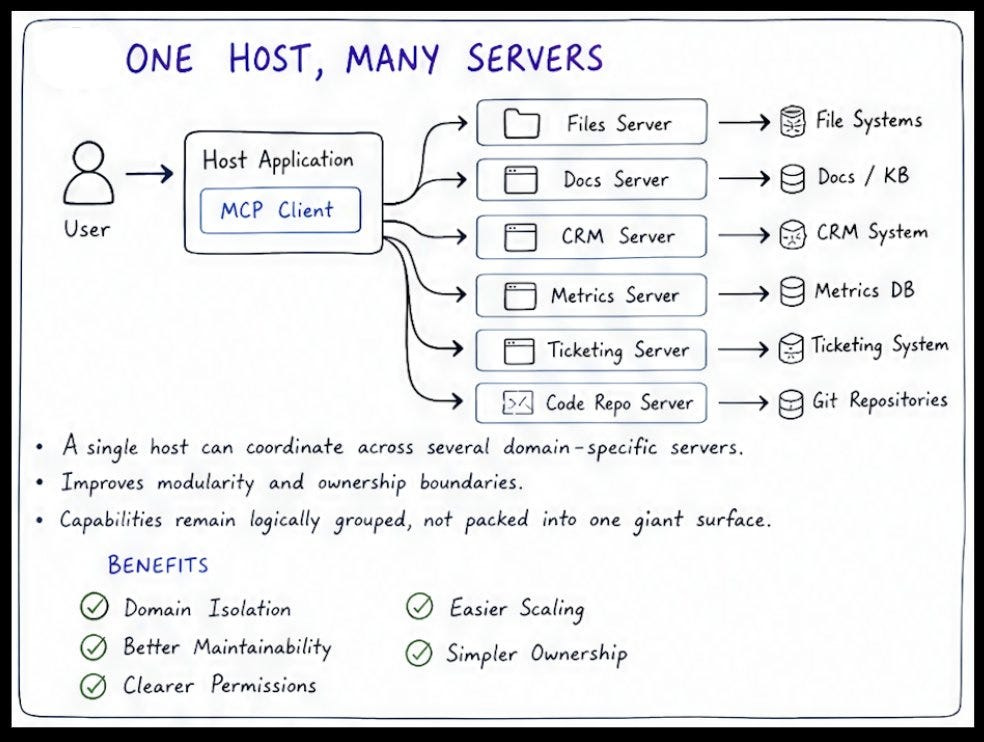
Instead of building a single giant server that exposes everything, you can separate servers bydomain:
Files server
Docs server
CRM server
Metrics server
Ticketing server
Code repository server
This gives you several advantages:
Better modularity: Each server focuses on a specific domain.
Clearer ownership: Different teams can own different capability surfaces.
Easier governance: Permissions, trust boundaries, and audit logic can be separated.
Better scalability: You can evolve or replace one domain server without affecting the rest.
Cleaner capability design: Capabilities remain understandable rather than being buried in a huge mixed interface.
This pattern becomes especially important in enterprise environments where domains,permissions, and operational concerns are naturally separated.
Common Deployment Shapes
MCP can be deployed in multiple ways depending on privacy, scale, and architecture needs.
1. Local Host + Local Server
Best for:
local tools,
desktop assistants,
privacy-sensitive workflows,
direct device integrations.
Example:
local IDE assistant connected to a local filesystem/code analysis MCP server.
2. Cloud Host + Remote Server
Best for:
shared services,
SaaS products,
centralized capabilities,
global access.
Example:
a web-based enterprise assistant connecting to a cloud-hosted docs or ticketing MCPserver.
3. Enterprise Multi-Server Model
Best for:
domain separation,
large organizations,
governance-heavy systems,
complex operational boundaries.
Example:
one enterprise host app connected to separate servers for HR, support, engineering, analytics, and internal knowledge.
There is no single perfect deployment pattern. The right choice depends on trust boundaries, latency requirements, ownership structure, and operational maturity.
Real-World MCP Scenarios
Here are two simple examples to make the model concrete.
Scenario 1: Metrics + Ticket Workflow
A user says:
“Check today’s error rate and open a ticket if it exceeds threshold.”
How it flows:
Host receives the request.
Client identifies the metrics capability.
Metrics server exposes a resource for reading error-rate data.
Host evaluates the returned result or uses workflow logic.
Client invokes a ticketing tool on another server.
Server creates the ticket through the backend ticketing system.
Host summarizes the outcome for the user.
Notice the split:
resource for reading metrics,
tool for creating the ticket.
That distinction keeps the architecture clean.
Scenario 2: Explain a Code File
A user says:
“Explain this source file.”
How it flows:
Host receives the request.
Client identifies a code/file resource.
File or repository server returns the content.
A reusable prompt may be applied for explanation style.
Host generates the final explanation for the user.
Again:
retrieving code is a resource, — formatting explanation guidance may come from a prompt,
no action tool is required unless the workflow modifies something.
Common MCP Architecture Mistakes
Even strong teams make the same mistakes early on.
1. Mixing host logic and backend logic
This creates a tightly coupled application that is hard to evolve.
2. Overloading the server
If the server starts owning UI behavior, multi-step assistant flows, or presentation concerns, itsboundary gets muddy.
3. Treating everything as a tool
Not every capability is an action. Read paths should usually be modeled as resources.
4. Exposing raw systems directly
MCP works best when backend complexity is abstracted into clear capability surfaces.
5. Weak protocol boundaries
If request schemas, validation, and response structures are inconsistent, interoperability anddebugging suffer.
6. Unclear ownership of validation and auth
These concerns should be deliberate, not accidental.
7. Designing for the demo, not for scale
A quick prototype may work with one giant mixed server, but production systems need cleanercapability boundaries.
Best Practices for Designing MCP Systems
Here are the practices that tend to hold up in real implementations.
Model capabilities explicitly
Be clear whether something is a:
tool,
resource,
or prompt.
Do not collapse these distinctions unnecessarily.
Keep boundaries clean
Each layer should have a focused responsibility.
Prefer modular servers
Split by domain, trust boundary, or ownership where it makes sense.
Use structured schemas
Predictable request and response formats improve reliability and debuggability.
Design for observability
Protocol communication should be inspectable. Debugging opaque AI integrations is painful.
Abstract backend complexity
The host should consume capabilities, not raw implementation details.
Optimize for reuse
Reusable capability surfaces are more valuable than one-off hardcoded workflows.
Design with governance in mind
Access controls, permissions, auditability, and domain isolation matter early especially in enterprise settings.
Architectural Trade-Offs
MCP architecture is powerful, but it is not free.
Benefits
cleaner mental model,
stronger modularity,
better domain isolation,
reusable capability surfaces,
easier governance,
better maintainability over time.
Trade-offs
more layers than direct integrations,
more upfront design work,
protocol modeling discipline required,
potential coordination overhead across multiple servers,
need for clear ownership across teams.
In practice, the trade-off is usually worth it once your system grows beyond a small prototype.
A direct integration might be faster for a one-off hack.
A layered MCP architecture is better when you need:
scale,
reuse,
reliability,
team ownership,
and long-term maintainability.
Final Takeaway
MCP core architecture matters because successful AI systems need more than good prompts, they need clean system boundaries.
When designed well, MCP gives you a durable structure for:
connecting reasoning to real-world capabilities,
separating orchestration from execution,
modeling actions and data access clearly,
and scaling AI integrations without turning your application into a tangled monolith.
If you remember only one thing, remember this:
The host orchestrates, the client communicates, the server exposes capabilities, andthe backend systems do the real work.
That mental model is the foundation for implementing, debugging, and scaling serious MCP-based systems.
Want to learn more?
Follow for more structured learning content on DevOps and Cloud. All my platforms: https://linktr.ee/techfusionist