
Learn Linux for DevOps in 10 Days | Terminal Beginner to Linux Pro
Learn Linux step-by-step with visual notes, real-world commands, and beginner-friendly explanations.

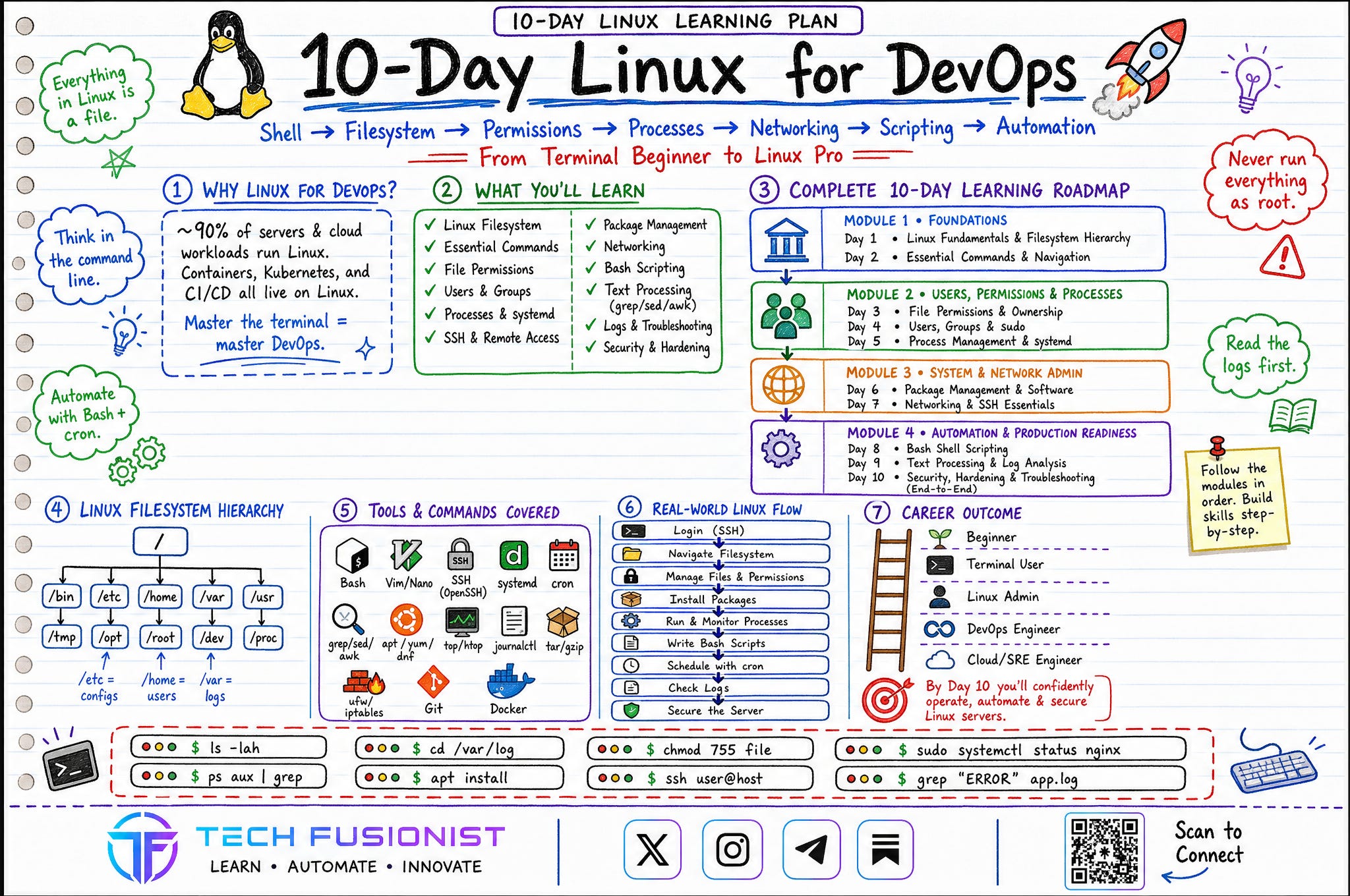
Most people learning DevOps skip Linux — and regret it later.
Not because Linux is hard. Because the command line feels intimidating and the learning path is scattered across a thousand browser tabs. So, I redesigned the entire journey into a visual 10-day Linux roadmap 🐧
This roadmap takes you from:
Shell → Filesystem → Permissions → Processes → Networking → Scripting → Automation
Everything is explained visually, step-by-step, and beginner-friendly. No unnecessary theory. Just a structured path to help you actually live in the terminal — the way real DevOps engineers do.
Building a resilient, high-performing culture means prioritizing fast recovery over finger-pointing and that starts with confidently navigating the systems you manage. Remember the one idea that ties it all together: in Linux, everything is a file. Master the terminal, and you master DevOps.
Roadmap Navigation
Module 1 → Foundations: Filesystem hierarchy, essential commands, navigation
PDF
Module 2 → Users, Permissions & Processes: Permissions, ownership, users, sudo, systemd
PDF
Module 3 → System & Network Admin: Package management, networking, SSH
PDF
Module 4 → Automation & Production Readiness: Bash scripting, log analysis, security & hardening
PDF
Module 1 - Foundations 🐧
Start here if the terminal still feels like a black box. This module builds the mental model you need before anything else: how Linux is structured, where files live, and the handful of commands you’ll type every single day.
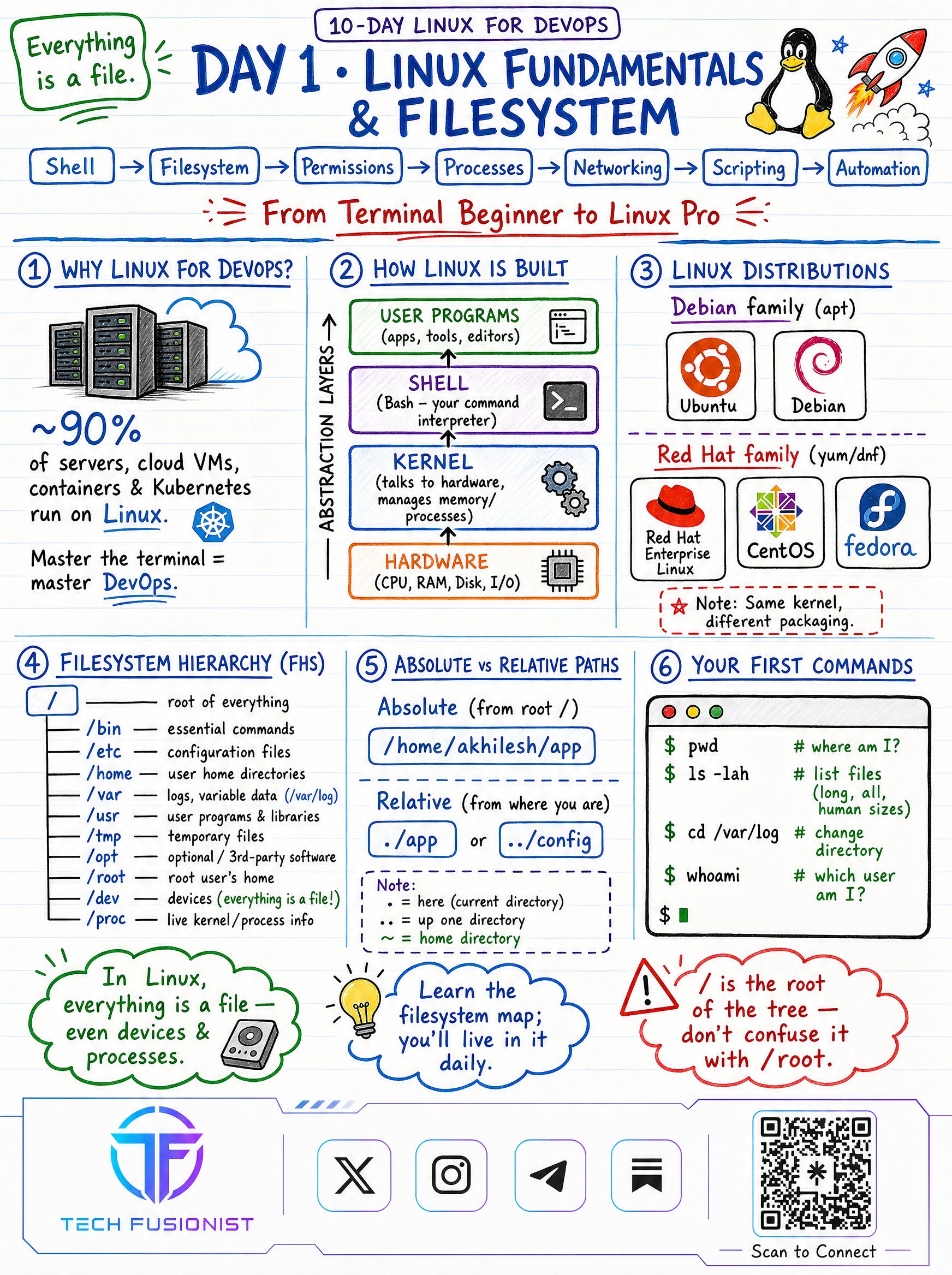
Day 1 - Linux Fundamentals & Filesystem
Why ~90% of servers run Linux , how the system is layered (hardware → kernel → shell → user programs) , the Debian vs Red Hat families , and the Filesystem Hierarchy (/usr/bin, /usr/sbin, /etc, /home, /var, /proc).
Tip:
/is the root of the tree — don’t confuse it with/root.
Day 2 - Essential Commands & Navigation
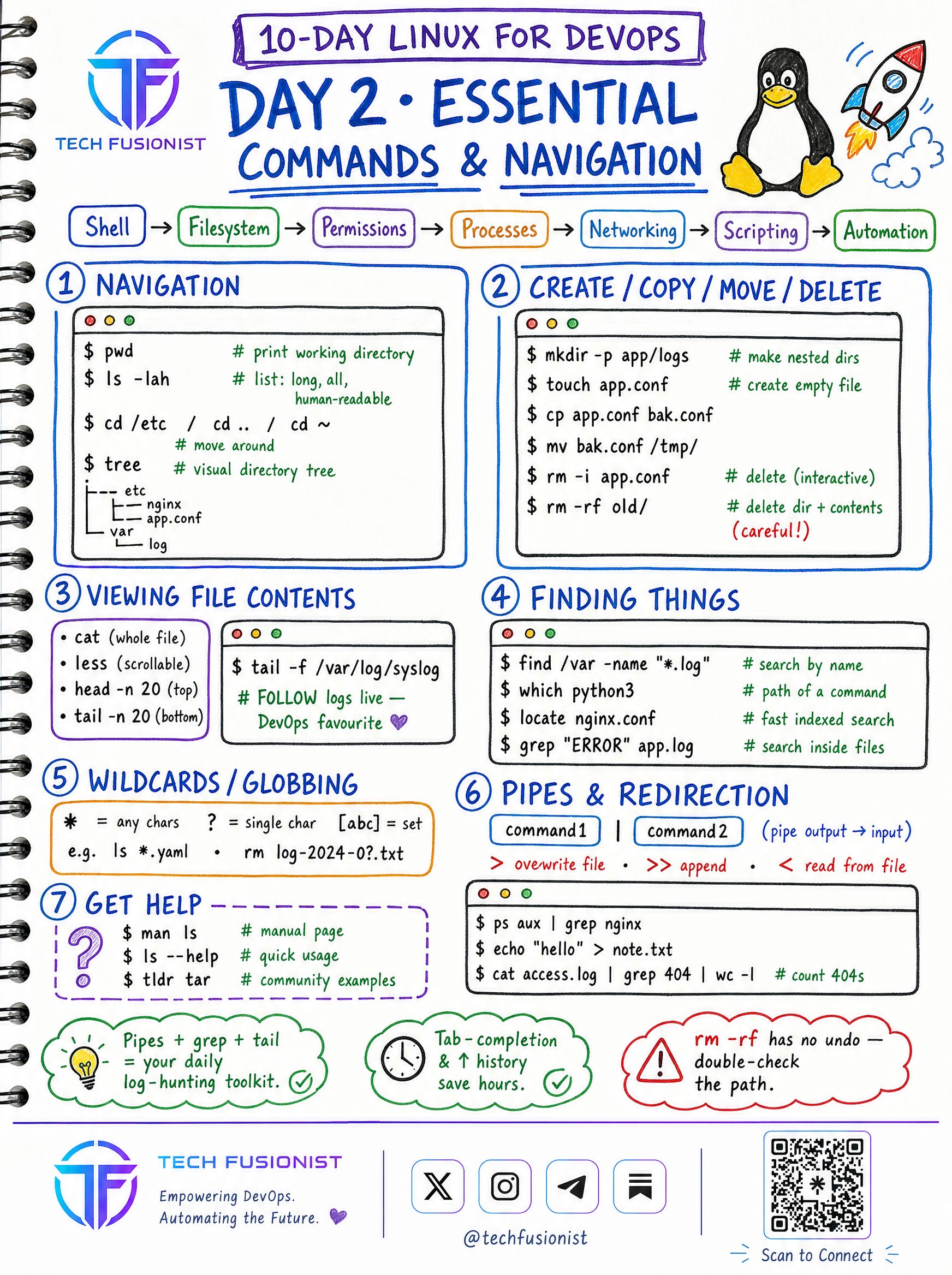
The daily toolkit: pwd, ls -lah, cd, tree , plus create/copy/move/delete, viewing files (cat, less, head, tail -f) , finding things (find, grep, locate) , wildcards, and pipes & redirection.
locate uses a database and may require updatedb before finding recently created files.
Tip: Pipes +
grep+tailbecome your log-hunting toolkit — andrm -rfhas no undo, so always double-check the path.
Module 2 - Users, Permissions & Processes 🐧
Now Linux starts feeling like real system administration. This module covers the trio that trips up every beginner on a live server: who can do what, who you are, and what’s actually running.
Day 3 - File Permissions & Ownership
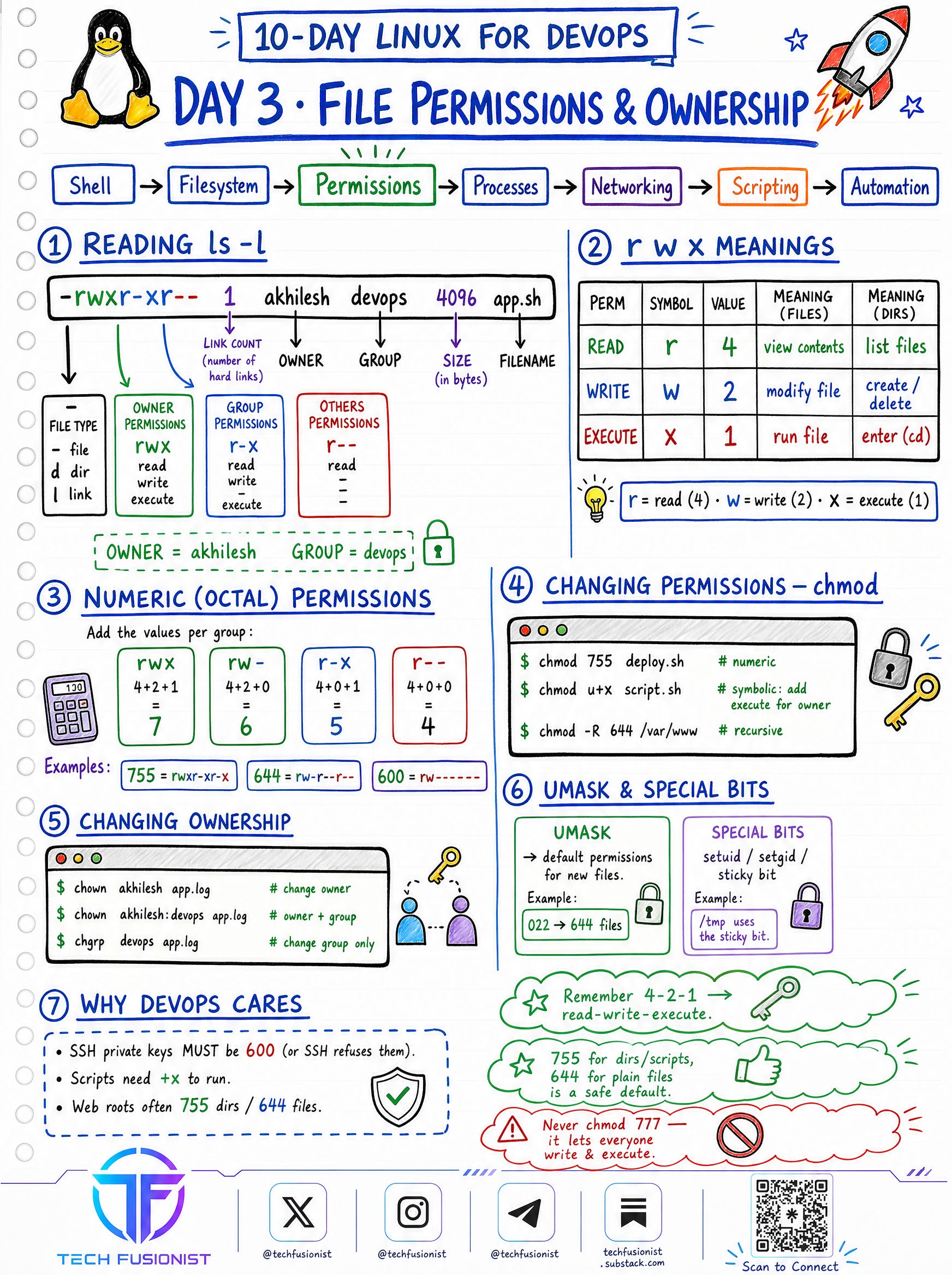
Reading ls -l, the rwx model , numeric (octal) permissions , chmod, chown/chgrp , umask and special bits. This is why your SSH key needs 600 and your scripts need +x.
Tip: Remember 4-2-1 , and Avoid
chmod 777unless you fully understand the security implications.
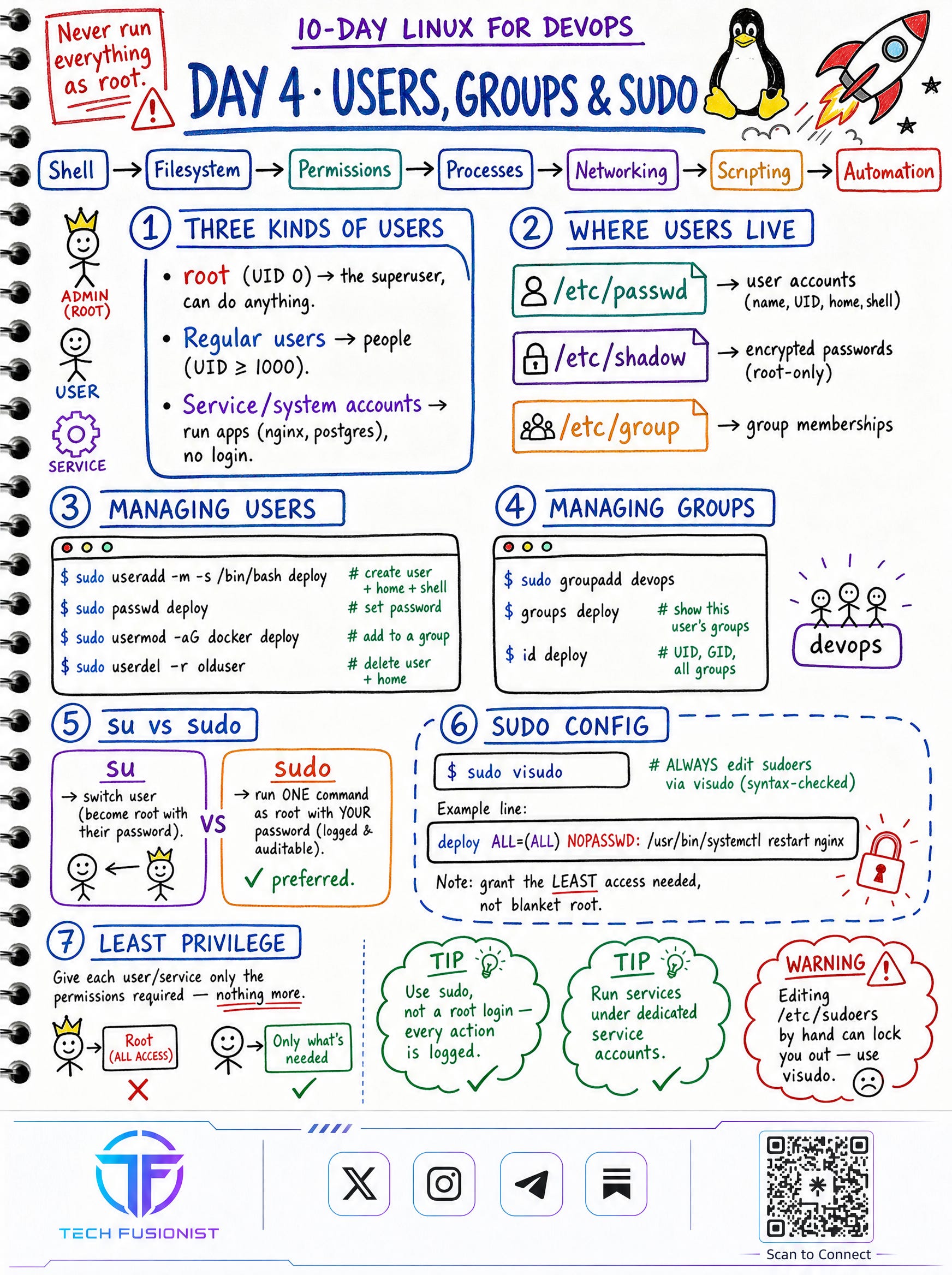
Day 4 - Users, Groups & sudo
The three kinds of users (root, regular, service accounts) , where users live (/etc/passwd, /etc/shadow, /etc/group) , managing users and groups, su vs sudo , and editing sudoers safely with visudo.
Tip: The golden rule: grant the least access needed, never blanket root.
Password hashes are stored in
/etc/shadow, not/etc/passwd.
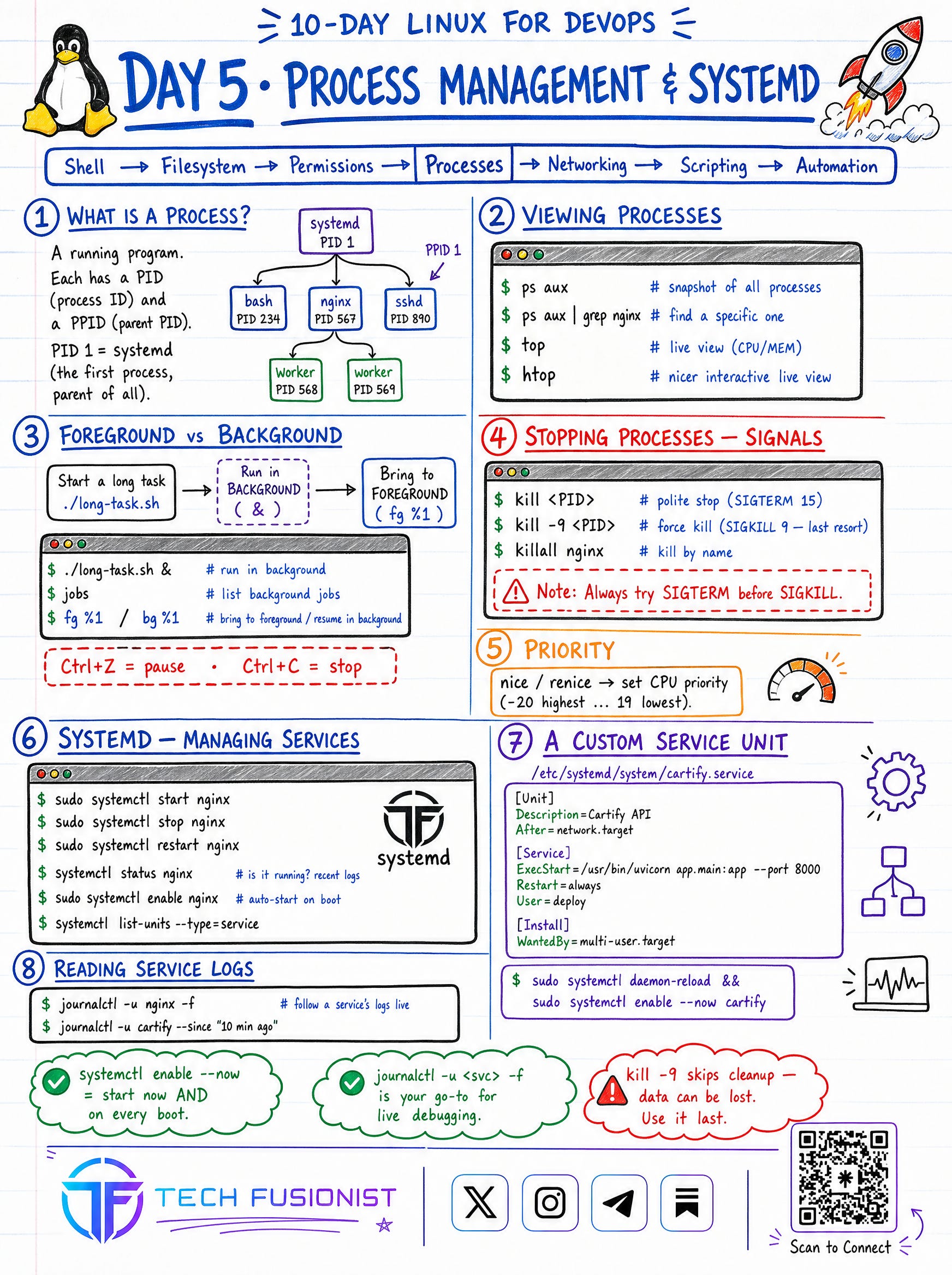
Day 5 - Process Management & systemd
What a process really is (PID, PPID, PID 1 = systemd) , viewing processes with ps/top/htop , foreground vs background jobs , signals (SIGTERM before SIGKILL) , priority with nice , and managing services with systemctl and journalctl.
Note: On most modern Linux distributions, systemd runs as PID 1.
Tip:
systemctl enable --nowandjournalctl -u <svc> -fbecome muscle memory.
Module 3 - System & Network Admin 🐧
This is where Linux begins to feel like real infrastructure engineering. You’ll learn how software gets onto a machine and how machines talk to each other — the two things every server depends on.
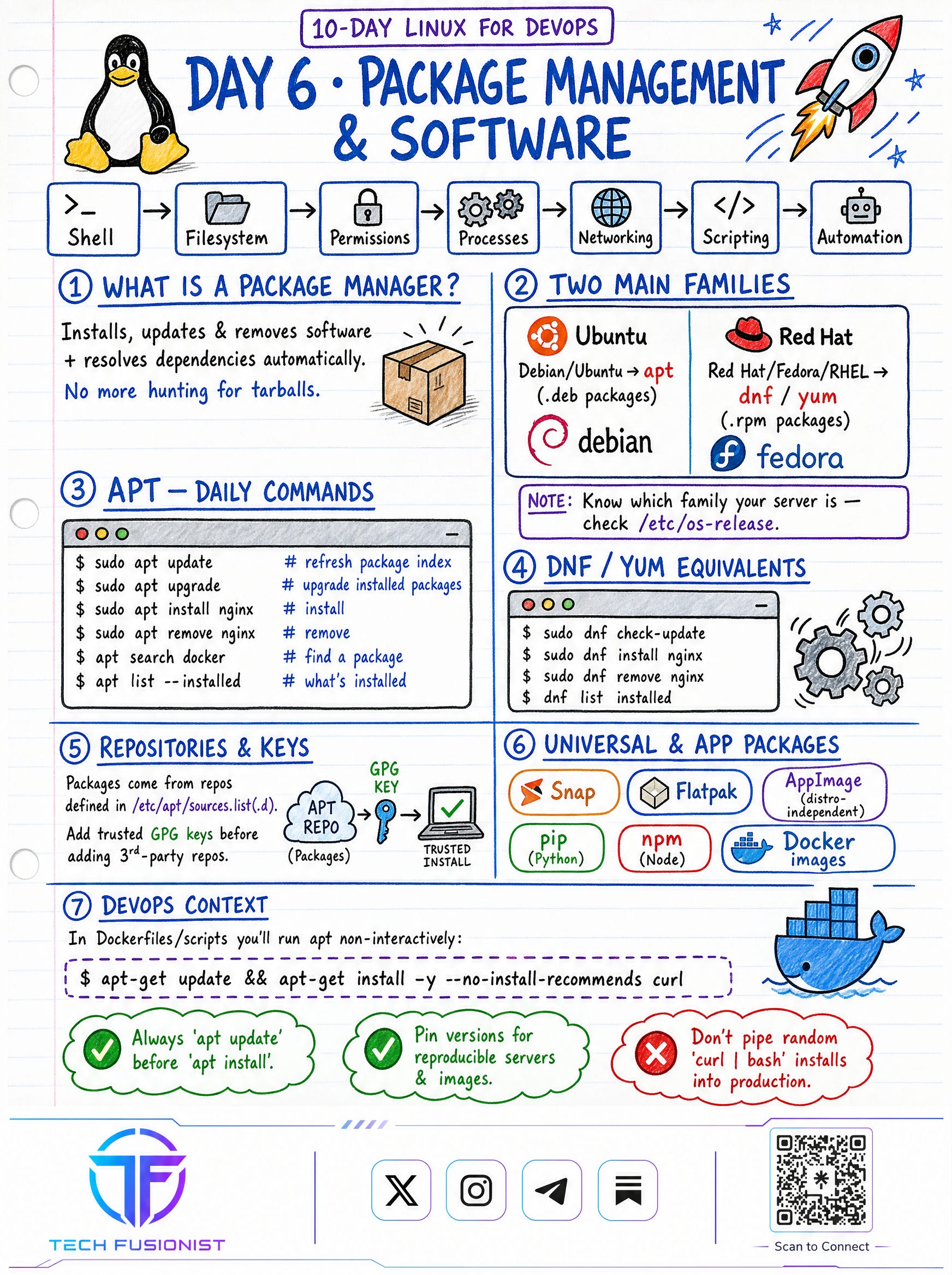
Day 6 - Package Management & Software
What a package manager actually does, the two families (apt for Debian/Ubuntu, dnf/yum for Red Hat/Fedora) , daily commands, repositories & GPG keys , and universal packages (Snap, Flatpak, pip, npm, Docker images).
Tip: Always
apt updatebeforeapt install- and never pipe a randomcurl | bashinto production.
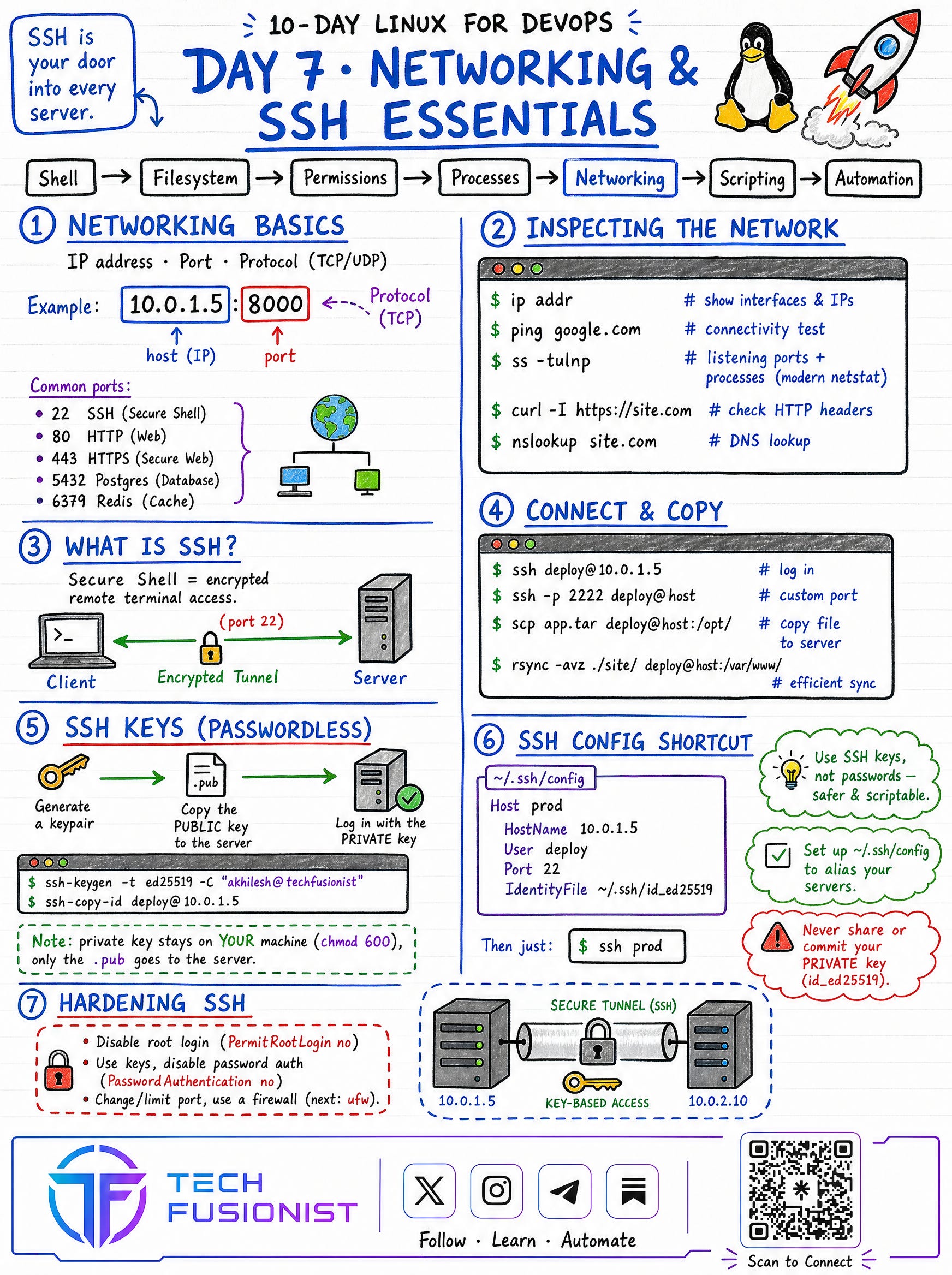
Day 7 - Networking & SSH Essentials
IP + port + protocol , common ports (22, 80, 443, 5432, 6379, 53, 3306) , inspecting the network (ip addr, ss -tulnp, curl -I, nslookup) , connecting and copying (ssh, scp, rsync) , passwordless SSH keys , the ~/.ssh/config shortcut , and hardening SSH.
Tip: Your private key stays on your machine (
chmod 600) — only the.pubgoes to the server.
Module 4 - Production Readiness 🐧
The final stage is where everything comes together into real automation. Scripting, log analysis, and security turn you from someone who uses a server into someone who can operate, automate, and defend one.
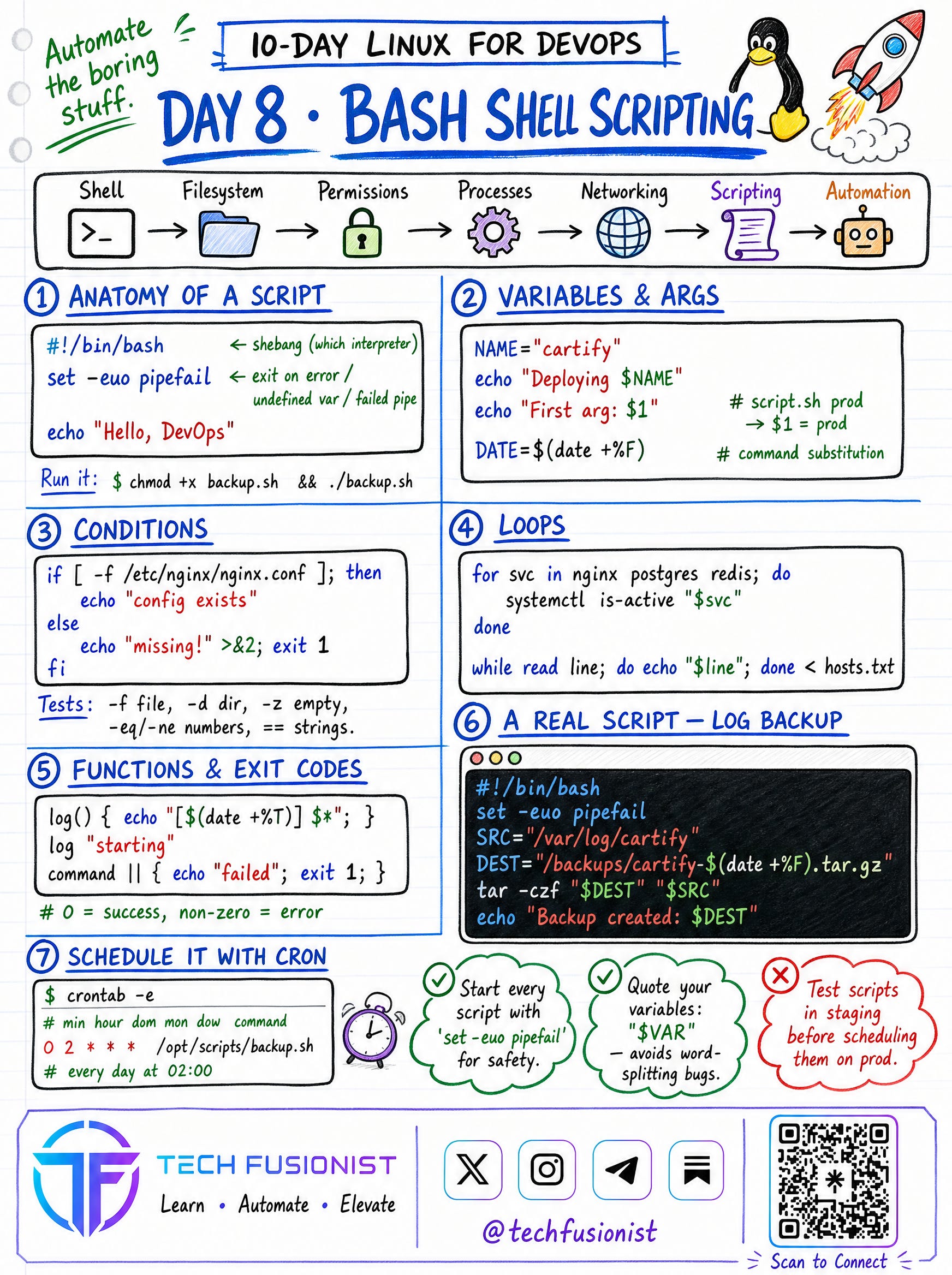
Day 8 - Bash Shell Scripting
Anatomy of a script (shebang, set -euo pipefail) , variables & arguments , conditions, loops , functions & exit codes , a real log-backup script , and scheduling with cron.
Note: Cron remains widely used, though modern distributions also support systemd timers.
Tip: Quote your variables (
"$VAR") to avoid word-splitting bugs , and always test in staging before scheduling on prod.
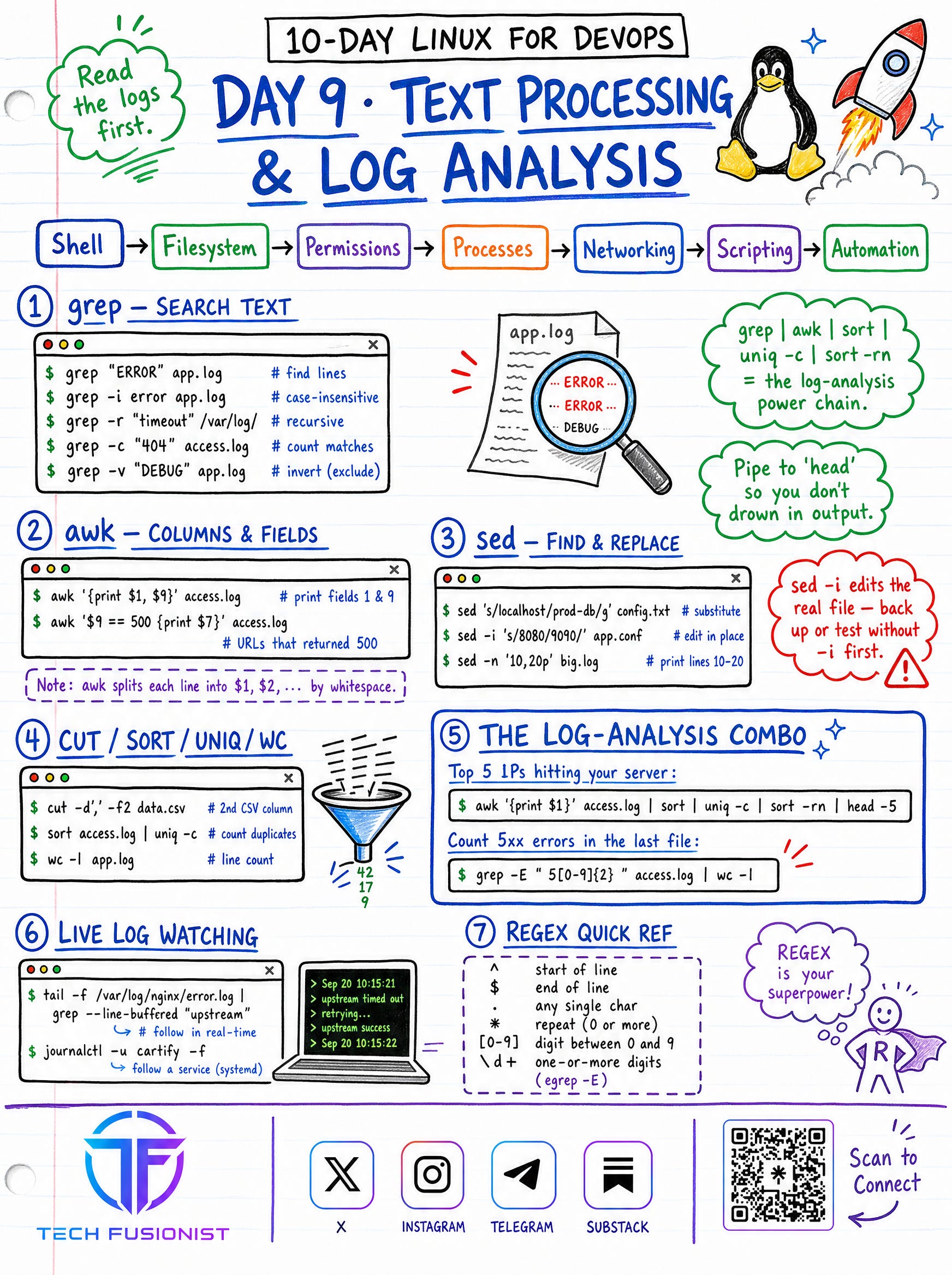
Day 9 - Text Processing & Log Analysis
The power chain every engineer leans on: grep | awk | sort | uniq -c | sort -rn | jq. Search with grep, slice columns with awk, find-and-replace with sed , and combine cut/sort/uniq/wc for instant answers from messy logs.
Tip: When something breaks, read the logs first.
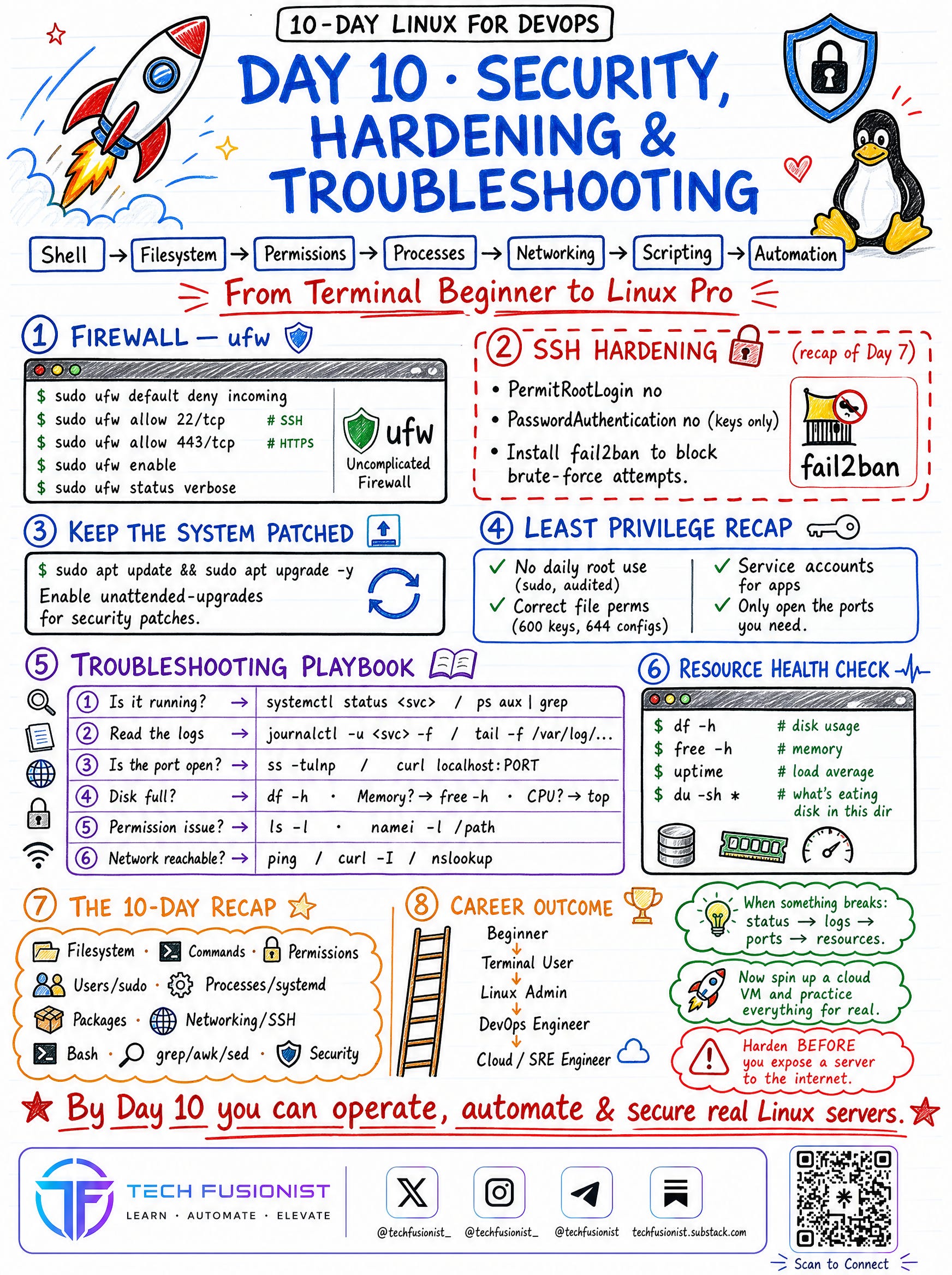
Day 10 - Security, Hardening & Troubleshooting
Locking a server down with firewalls, SSH hardening recap, keeping the system patched, the least-privilege checklist, a step-by-step troubleshooting playbook (status → logs → ports → resources), and resource health checks.
Tip:
Harden before you expose a server to the internet.
Disable password authentication and prefer SSH keys whenever possible.
Progress Tracker 🐧
[ ] Module 1 • Foundations
[ ] Module 2 • Users, Permissions & Processes
[ ] Module 3 • System & Network Admin
[ ] Module 4 • Production Readiness
Continue the Journey 🐧
Linux gets easier the moment you stop reading about it and start typing. Don’t try to memorize every flag.
Focus on:
Navigating the filesystem without thinking.
Fixing permissions and ownership confidently.
Reading logs to diagnose problems.
Writing small scripts to automate the boring stuff.
Hardening a box before it goes live.
That is how real Linux confidence is built. By Day 10, you’ll be able to operate, automate, and secure real Linux servers - the foundation everything else in DevOps sits on.
Follow Tech Fusionist on other platforms for more DevOps, Cloud, Linux, Kubernetes, and AI content.
🔗 Linktree: https://linktr.ee/techfusionist